
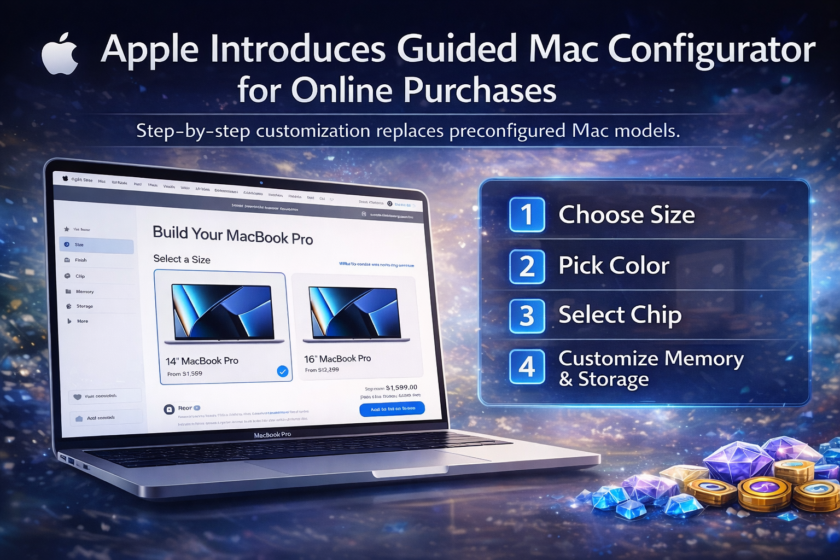
Apple has quietly introduced a significant Apple Mac checkout redesign on its online store. The long-standing preconfigured Mac models have been replaced with a guided, step-by-step configurator, requiring buyers to build their Mac from scratch. This update aligns the Mac buying experience with how Apple sells iPhones and iPads, while also reshaping how users interact with choices, upgrades, and pricing.
The change brings the Mac lineup in line with how Apple already sells iPhones and iPads, but it also represents a philosophical shift in how the company presents choice, simplicity, and upgrades. While the redesign promises a more unified buying experience across Apple’s ecosystem, it has also sparked debate about usability, transparency, and pricing psychology.
This article breaks down what changed, how the new system works, why Apple may have made the move now, and what it means for everyday Mac buyers.
Apple Quiet Storefront Changes Didn’t Go Unnoticed
The redesign was first spotted by the French Apple-focused blog Consomac, before quickly spreading through Reddit threads and Apple community forums. What stood out wasn’t just a visual refresh, but the complete removal of the traditional Mac landing pages that showcased a handful of ready-made configurations.
For years, Apple presented customers with a small number of “good, better, best” Mac options — carefully curated combinations of chips, memory, and storage. These prebuilt models acted as anchors, simplifying decision-making for casual buyers while still allowing power users to customize if they wished.
That familiar approach is now gone. Apple Mac checkout redesign
Across the entire Mac lineup — including MacBook Air, MacBook Pro, iMac, Mac mini, Mac Studio, and Mac Pro — clicking the “Buy” button no longer reveals preselected configurations. Instead, users are dropped directly into a build-it-yourself flow.
From Curated Choices to Complete Customization
At the heart of the change is Apple’s new guided configurator, a multi-step purchase process that requires customers to make individual decisions in a fixed order.
Rather than choosing from a list of finished models, buyers now construct their Mac from the ground up. The system is designed to feel intuitive and structured, but it also demands more active participation than before.
For many users, this represents a fundamental shift. Apple is no longer “suggesting” the most popular Mac setups up front. Instead, it’s asking customers to define exactly what they want — whether they fully understand those choices or not.
How the New Mac Checkout Process Works
The new checkout experience follows a linear, step-by-step format. While the exact steps vary slightly depending on the Mac model, the overall structure remains consistent.
Using the MacBook Pro as an example, the process unfolds as follows:
Step 1: Choose Screen Size
Customers begin by selecting a display size, such as 14-inch or 16-inch. This initial choice immediately filters the available hardware options that follow.
Step 2: Pick a Color
Once the size is locked in, Apple prompts users to select a color finish. While largely cosmetic, this step reinforces Apple’s emphasis on personalization early in the process.
Step 3: Select Display Type
Depending on the model, buyers may choose between different display technologies or brightness levels, such as standard Liquid Retina or higher-end options.
Step 4: Choose the Chip
Only after these visual and form-factor decisions does Apple introduce the processor. Users select between available Apple Silicon options, such as base, Pro, or Max-tier chips where applicable.
Step 5: Customize Memory and Storage
RAM and storage are handled in a separate “Customizable Specs” section. Here, Apple attempts to guide users by flagging incompatible configurations and steering them toward supported combinations.
In theory, this system reduces errors. In practice, some friction remains.
Early Friction Points and User Complaints
Despite Apple’s reputation for polish, early users have already pointed out rough edges in the new configurator.
One common complaint is that the tool still displays memory options that aren’t compatible with the selected chip. This forces users to backtrack and revise earlier decisions — a frustrating experience that contradicts Apple’s usual emphasis on seamless flow.
Others note that removing preconfigured models makes it harder to quickly compare prices. Under the old system, shoppers could scan multiple options at a glance and immediately see what an extra few hundred dollars bought them. Now, that comparison requires mental math and repeated navigation.
These issues aren’t deal-breakers, but they highlight the challenge of balancing flexibility with clarity.
Why Apple May Have Made This Change Now
Timing matters, and Apple’s decision to redesign its Mac checkout experience doesn’t appear random.
The company is widely expected to refresh parts of its Mac lineup in the near future, including higher-end MacBook Pro models powered by next-generation Apple Silicon. A new store architecture lays the groundwork for introducing new chips without restructuring the entire storefront each time.
From an operational perspective, a unified configurator also simplifies Apple’s backend systems. Rather than maintaining separate landing pages for each preconfigured model, Apple can dynamically adjust available components based on inventory, region, or future hardware launches.
Aligning Macs With iPhones and iPads
Another likely motivation is consistency.
Apple already sells iPhones and iPads using a similar build-first approach. Customers choose size, color, storage, and connectivity step by step. Bringing Macs into the same framework creates a cohesive buying experience across product categories.
For new customers entering Apple’s ecosystem, this consistency may feel natural. For long-time Mac buyers, however, it represents a noticeable departure from tradition.
The Psychology of Step-By-Step Upgrades
There’s also a less charitable interpretation of the redesign — one rooted in behavioral economics.
Walking users through each component individually can subtly encourage upgrades. When options are presented one at a time, each price increase feels smaller and more isolated. An extra $200 for storage or memory may seem reasonable in the moment, even if the final total ends up far higher than expected.
Under the old system, premium configurations were visible upfront, making their higher prices more obvious. The new flow spreads those decisions out, potentially nudging buyers toward more expensive builds.
Whether this is intentional or simply a side effect of the new design is open to debate, but the incentive is clear.
Impact on First-Time Buyers
For newcomers to the Mac platform, the new configurator is a double-edged sword.
On one hand, it offers clarity by breaking the process into manageable steps. On the other, it assumes a certain level of technical understanding. Terms like unified memory, core counts, and chip tiers may confuse buyers who just want a “good laptop.”
Without preconfigured recommendations acting as guardrails, less experienced users may feel uncertain — or worse, overspend on specs they don’t actually need.
Power Users Gain Control, Lose Speed
Experienced Mac buyers and professionals may appreciate the granular control the new system provides. Being able to define a machine exactly to spec without wading through preset bundles can feel empowering.
That said, speed suffers. What once took a few clicks now requires multiple decisions, even for buyers who already know what they want. For repeat customers ordering similar machines, the lack of quick-select configurations may feel inefficient.
How This Affects Price Transparency
One of the most notable side effects of the redesign is reduced price transparency.
Previously, Apple’s pricing ladder was visible at a glance. Buyers could instantly understand the cost difference between entry-level and high-end machines. Now, prices evolve dynamically as each component is selected.
While the final price is always visible, the lack of side-by-side comparisons makes it harder to evaluate value quickly — particularly for shoppers on a budget.
A Foundation for Future Hardware Launches
Looking ahead, the new checkout system appears designed with longevity in mind.
As Apple continues iterating on its custom silicon roadmap, the configurator allows new chips, memory tiers, and storage options to be slotted in seamlessly. This flexibility is especially important for professional Macs, where configurations can vary widely.
If Apple plans more frequent Mac updates, a modular store experience reduces friction on both the company and the customer side.
What This Means for Apple’s Retail Strategy
This redesign reflects a broader shift in Apple’s retail philosophy: fewer assumptions, more direct choice.
Instead of telling customers what the “right” Mac looks like, Apple is handing over the responsibility — and the risk — to the buyer. That approach aligns with Apple’s push toward personalization across hardware and services, but it also changes the brand’s traditional role as a curator.
Will Apple Refine the Experience Further?
Based on early feedback, refinements seem inevitable.
Apple is known for iterating quietly, and minor usability issues — such as incompatible option visibility — are likely to be resolved over time. The company may also reintroduce some form of recommended configurations within the new framework, especially if confusion persists.
For now, the system feels like a first step rather than a final destination.
Final Thoughts
Apple Mac checkout redesign experience isn’t a radical reinvention, but it is a meaningful evolution.
By removing preconfigured models and embracing a guided build process, Apple has unified its product buying experience while gaining flexibility for future launches. At the same time, the change introduces new friction, particularly for casual buyers who valued simplicity over customization.
Whether this redesign ultimately benefits customers depends on how Apple refines it — and how transparent it remains as hardware options continue to expand.
For now, one thing is clear: buying a Mac online is no longer a passive experience. Apple Mac checkout redesign wants you involved in every choice, for better or worse.